How to backtest an Expert Advisor in MT5
Key takeaways
- Treat every backtest as a reproducible experiment, not as proof that an EA will make money.
- Validate the test itself first: confirm the correct EA and inputs loaded, inspect the Journal, and watch at least one short visual run.
- Compare unchanged rules across separate time windows. A polished result from one selected period is not evidence of robustness.
MetaTrader 5 Strategy Tester can replay an Expert Advisor against historical market data. It is useful for checking execution logic, studying risk, and finding failure modes before a demo or live deployment. It cannot reproduce every future spread, fill, outage, liquidity event, or change in market behaviour.
The practical goal is therefore not to produce the most attractive equity curve. It is to create a test that another person—or you, several months later—can rerun from the same code, inputs, market symbol, and data assumptions.
MetaQuotes documents the tester's controls and modelling modes in its official Strategy Testing guide opens in a new tab. Keep that reference open because labels can move between MT5 builds and broker-distributed terminals.
Before opening Strategy Tester
Prepare these items first:
| Item | What to record |
|---|---|
| EA source and binary | File name, version or commit, and compile date |
| Compile result | 0 errors; investigate warnings that affect logic or types |
| Terminal | MT5 build number from Help → About |
| Account environment | Server name, account currency, account type, and leverage |
| Instrument | The exact server-side symbol, such as EURUSD, EURUSD.a, or another suffix |
| Contract specification | Digits, tick size, tick value, volume step, stops level, trading sessions, commission, and swap |
| Historical window | Earliest and latest dates that are actually available for the symbol |
An exact symbol matters. Two brokers can expose instruments with similar display names but different contract sizes, price precision, sessions, costs, and minimum stop distances. Results are not portable simply because the chart label looks familiar.
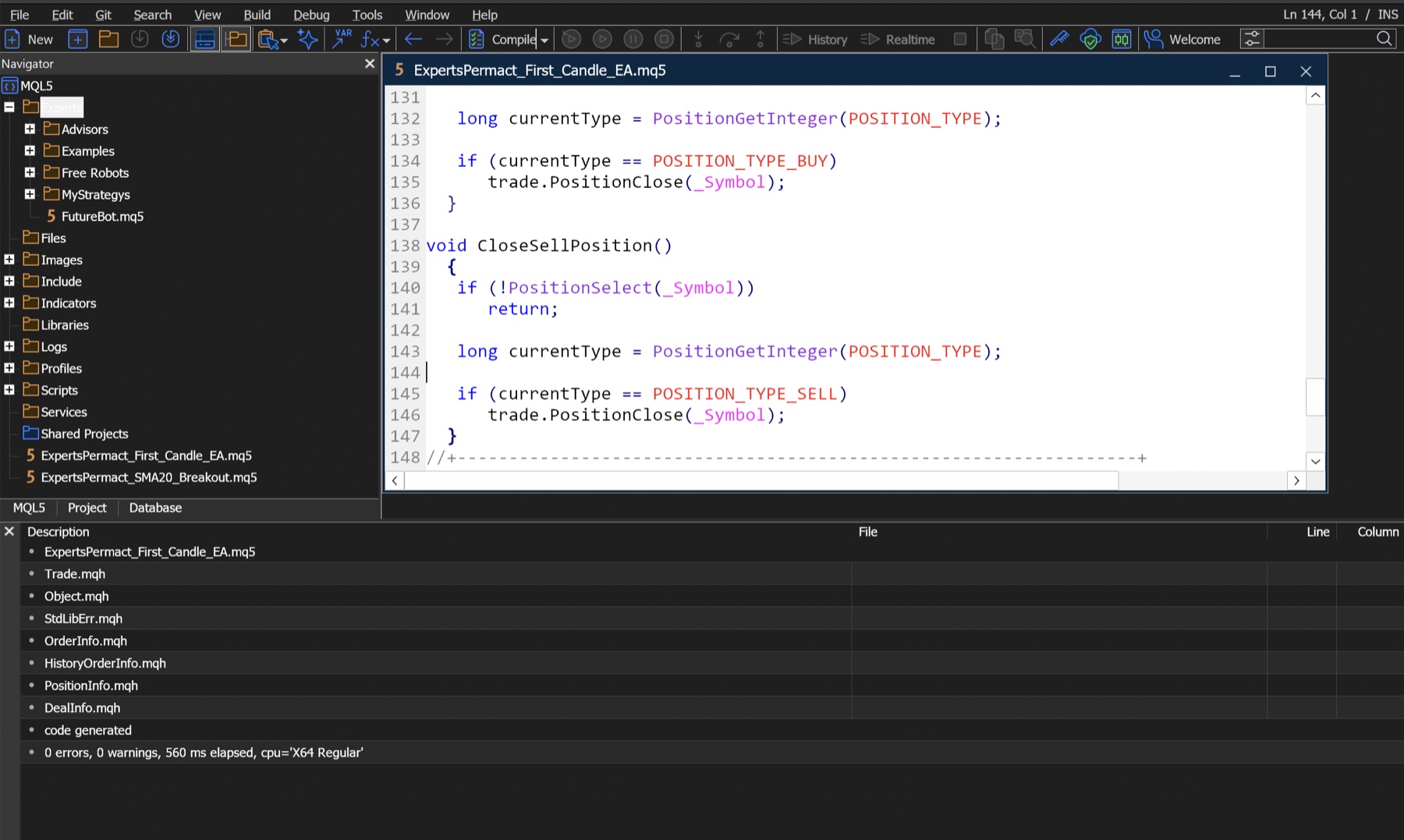
If you do not yet have a compiled EA, start with Build and Run Your First MQL5 EA.
Open Strategy Tester and find the right screen
Press Ctrl+R, or choose View → Strategy Tester. Depending on the terminal build, the panel may show tabs such as Overview, Settings, Inputs, Backtest, Graph, Agents, and Journal.
Overview is not normally the performance report. In current builds it acts mainly as a task launcher—with cards such as Single, Visualize, or Optimization—and as a list of previous runs. Configure a single test in Settings. After the run, look for statistics in Backtest; some builds or older documentation call the corresponding area Results.
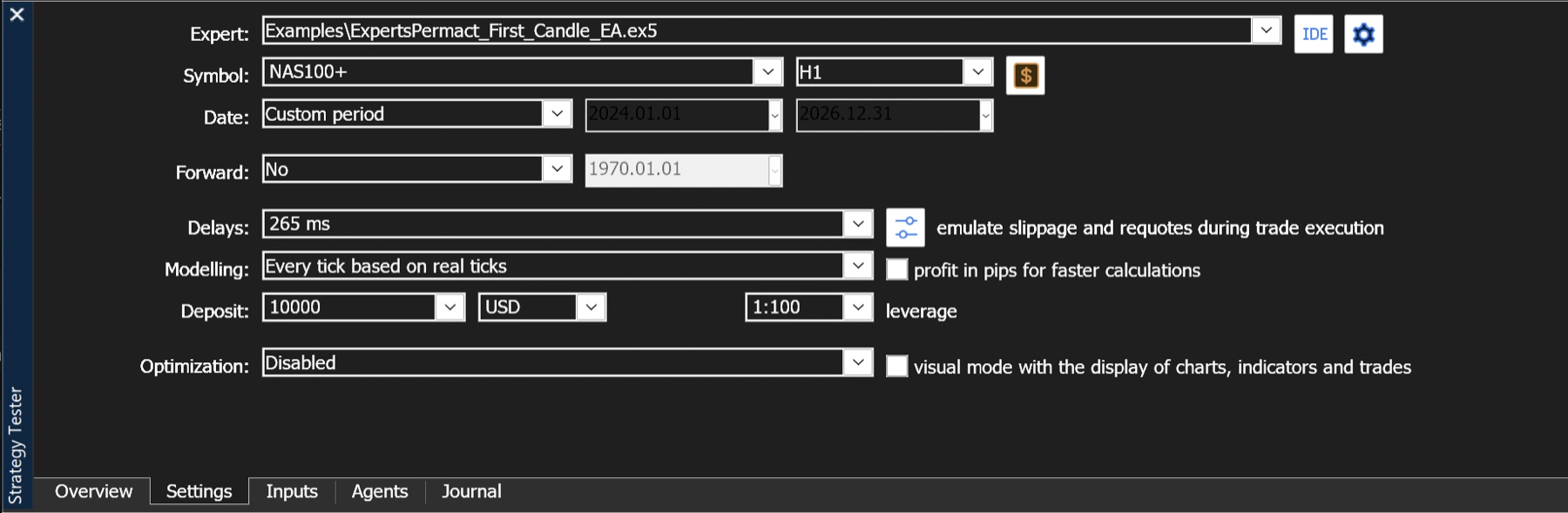
The screenshot illustrates where the controls are. Its 2026.12.31 end date is a future placeholder, not a completed historical test. For a reproducible run, choose a completed past end date within the history actually available from the selected server.Configure one controlled baseline
Do not change several things at once. Establish one baseline run and write down the settings below.
| Setting | How to choose it | Why it changes the result |
|---|---|---|
| Expert | Select the compiled EA version under test | A similarly named binary may contain different logic |
| Symbol | Use the exact symbol from the intended account environment | Contract rules and historical data are symbol-specific |
| Timeframe | Match the timeframe the strategy was designed to read | Bar-dependent signals change when the period changes |
| Date | Enter explicit start and end dates | Relative presets move over time and are hard to reproduce |
| Forward | Leave off for the first diagnostic run; plan a separate holdout later | Forward selection changes which data is used for development and validation |
| Deposit | Match the comparison scenario and keep it unchanged | Margin, position sizing, and percentage drawdown depend on it |
| Leverage | Match the target account specification | It affects margin availability, not the quality of the trading rule |
| Execution delay | Record the selected delay model, if available | A zero-delay run can hide timing sensitivity |
| Optimization | Disable it for the baseline | A single run is easier to diagnose before parameter search |
There is no universally correct deposit, leverage, symbol, or timeframe. The defensible choice is the one that matches the environment you are studying and is recorded precisely enough to repeat.
Choose a modelling mode that matches the EA
MT5 may offer several tick-generation modes. Faster is not automatically better, and slower is not automatically more realistic.
| Mode | Appropriate use | Important limitation |
|---|---|---|
| Every tick based on real ticks | Final verification when broker-provided real-tick history is available | Availability and history coverage vary; it still does not reproduce future execution |
| Every tick | Logic that depends on intrabar prices when real ticks are unavailable | Ticks are generated from lower-timeframe data rather than observed tick-for-tick |
| 1 minute OHLC | Faster diagnostic runs for logic that does not require the path within each minute | Stops and intraminute sequencing can differ from tick-based results |
| Open prices only | EAs deliberately designed to act once at a new bar | Unsuitable when entries, exits, trailing stops, or indicators depend on intrabar movement |
Use a faster mode to find obvious code defects, then rerun important candidates with the most appropriate higher-detail mode. If a strategy changes character when you switch modes, investigate why instead of choosing the prettier result.
Also check the date range reported by the tester. A requested three-year run is not truly a three-year experiment if the symbol history begins halfway through it.
Save and verify Inputs
Open Inputs and record every non-default value. When the terminal offers Save/Load, export a .set file alongside the test notes. Give it a name that identifies the EA, symbol, timeframe, and date, for example:
first-candle-ea_v1.1_EURUSD_H1_2023-01-01_2025-12-31.setFor a simple EA, the list may include:
| Input | Verification question |
|---|---|
| Volume or risk input | Is sizing fixed, balance-based, or stop-distance-based? |
| Stop-loss distance | Is the unit points, price, pips, ticks, or volatility? |
| Take-profit distance | Is it valid for this symbol's tick size and stops level? |
| Session filter | Which server timezone does it use? |
| Signal timeframe | Does it use the chart/test timeframe or an internal period? |
| Magic number | Can its orders be separated from other EAs? |
Never assume a label ending in Points means pips. In MQL5, _Point is the symbol's point value; the valid tradable increment can also be constrained by tick size.
Run a short visual test before a long batch
Turn on visual mode for a short, representative interval. The purpose is debugging, not admiring the simulated profit.
Watch for these behaviours:
- The EA waits for the intended signal rather than trading immediately by accident.
- Entry direction and timing match the written strategy rule.
- It does not submit duplicate orders on every tick.
- Stop loss and take profit appear on the correct side of the market.
- Opposite-signal exits occur only for the selected matching-magic position; a hedging account still requires ticket-level enumeration.
- Positions do not remain open outside the intended session or at the end of the test unexpectedly.
Then inspect Journal. Repeated errors such as invalid stops, insufficient funds, a disabled market, or failed price access invalidate the interpretation of the performance statistics until the execution problem is understood.
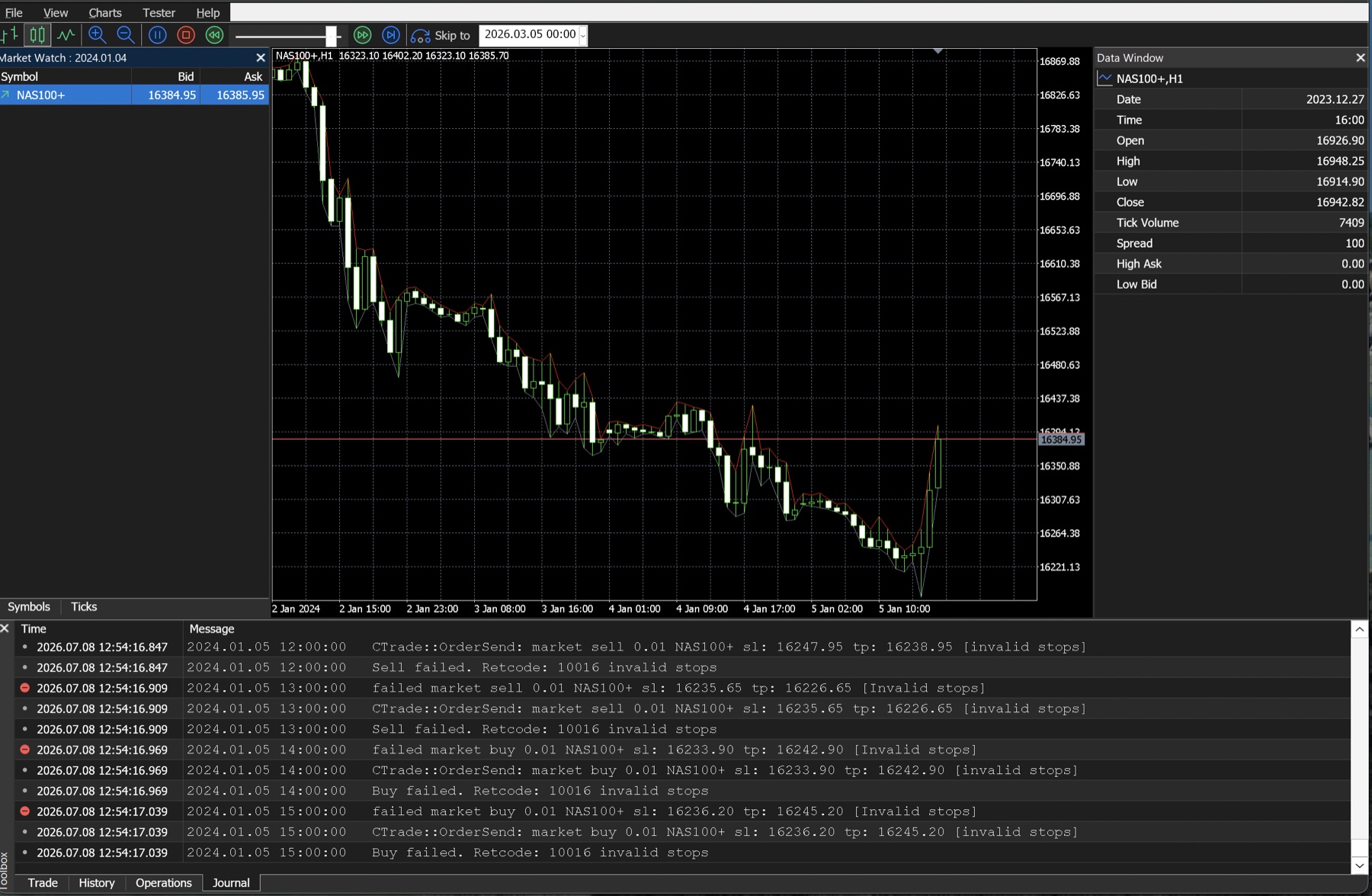
If you see invalid-stops errors, use How to Fix “Invalid Stops” in MT5 before comparing returns.
Separate development from validation
Running the same period repeatedly while changing parameters turns that period into development data, even if you never call it optimization. Reserve data that you do not inspect while designing the rules.
One practical structure is:
| Window | Purpose | Rule |
|---|---|---|
| Development | Find defects and make deliberate rule changes | Changes are allowed, but document each one |
| Out-of-sample | Check the frozen EA and inputs on unseen dates | Do not retune after seeing the result without declaring a new research cycle |
| Stress periods | Study gaps, spread expansion, trends, ranges, or high volatility | Use named dates and explain why they were selected |
| Forward demo | Observe current quotes, sessions, and execution behaviour | Do not treat demo fills as identical to live fills |
Use multiple contiguous windows rather than searching for a favourable start date. Keep the EA, inputs, symbol, timeframe, and sizing unchanged when the question is “does the same configuration behave differently over time?”
A reproducible test record
Copy this template into a plain-text note, spreadsheet, or repository issue for every run you plan to compare:
Test ID:
Run timestamp and timezone:
MT5 build / server:
EA file / version / commit:
Symbol / contract notes:
Timeframe:
Start date / end date:
Modelling mode:
History coverage / quality shown:
Execution delay setting:
Deposit / currency / leverage:
Inputs file:
Commission / swap / spread assumptions:
Journal warnings or errors:
Report export path:
Reason for this run:
Decision and next test:
Screenshots are useful evidence, but they are not a complete experiment record. They often omit the build, exact dates, hidden inputs, data coverage, and the EA version.
What to inspect after the run
Use this order:
Journal: Were data and trade operations valid?SettingsandInputs: Can the run be reproduced?BacktestorResults: How many trades occurred, and what were the net result and drawdowns?- Deal/order history: Did entries and exits follow the rule?
Graph: Did open-equity risk diverge from the closed-balance curve?
Do not begin with Total Net Profit. A positive result may be dominated by one outlier, based on very few observations, or produced while intended orders were repeatedly rejected.
The companion guide, How to Read an MT5 Strategy Tester Report, explains this sequence and the main statistics in detail.
Pre-demo checklist
- The exact EA version compiles and is archived with its inputs.
- The symbol specification and available history have been recorded.
- A visual run confirms entries, exits, and position limits.
- The Journal has no unexplained recurring errors.
- The detailed modelling run does not reveal behaviour hidden by the faster run.
- Development and out-of-sample dates are clearly separated.
- Results have been compared across unchanged, contiguous windows.
- Costs, spread behaviour, delay, and data limitations are stated.
- The conclusion describes uncertainty and failure modes, not a profit promise.
Passing this checklist does not make an EA safe or profitable. It means the backtest is documented well enough to justify the next research step.
Frequently asked questions
Why does my Backtest tab not appear?
Tab names vary by MT5 build and terminal distribution. Finish a single test, then look for Backtest or Results. Overview is generally the task/start screen, not the statistics report.
Should I enable optimization immediately?
No. First prove that one configuration executes as designed and produces a reproducible report. Optimization multiplies both useful experiments and hidden mistakes.
Is “Every tick based on real ticks” the same as live trading?
No. It can provide more detailed historical price paths when real-tick data is available, but it cannot know future liquidity, delays, rejected orders, disconnections, or your live account's fills.
Can I compare results from two brokers?
Only with explicit caveats. Compare symbol specifications, sessions, historical coverage, spreads, commissions, swaps, and execution assumptions first. A matching instrument name is not enough.
Risk note
Backtests are simulations based on historical data and selected assumptions. They do not guarantee future performance. Leveraged products can produce losses larger and faster than an unleveraged cash position, and an automated system can repeat a faulty rule without human intervention.
This guide is educational and does not recommend a broker, instrument, EA, or trade. Verify current tester behaviour in the official Strategy Testing documentation opens in a new tab and the MQL5 program-testing reference opens in a new tab.
Up next
Next, read How to Read an MT5 Strategy Tester Report. It shows how to audit the Journal first, locate statistics under Backtest or Results, distinguish balance from equity drawdown, and detect a result dominated by a few trades.