How to fix “Invalid Stops” in MT5
Key takeaways
Invalid stopsis a category of rejection, not a complete diagnosis. Capture the requested prices and the symbol rules at the exact time of failure.- Points, pips, decimal digits, and trade tick size are not interchangeable. A price can have the right number of decimals and still be off the tradable price grid.
- Initial stop placement and later stop modification have different constraints; check the stops level for placement and the freeze level when modifying near the market.
An Expert Advisor can compile cleanly and still have every order rejected. In MetaTrader 5, the Journal may show invalid stops, while an MQL5 trade request can return TRADE_RETCODE_INVALID_STOPS (10016). The server is saying that at least one requested stop-related price is unacceptable under the symbol's current trade rules.
That does not automatically mean “make the stop loss wider.” The stop may be on the wrong side, rounded to an invalid tick, based on a stale quote, inside a freeze zone during modification, or invalid because a pending order has additional distance rules.
Use the MQL5 trade-server return-code reference opens in a new tab to identify the server response, then work through the evidence below.
What counts as a stop
The error can involve more than a protective stop loss:
- stop loss (
SL) - take profit (
TP) - pending-order entry price
- stop-limit price
- a later modification of any of those levels
The valid side and reference price depend on order type and market model. The table below covers protective SL/TP for common non-exchange symbols. Pending orders require their own entry-price and stop-limit checks.
| Position side | Stop loss | Take profit | Conservative current-price reference |
|---|---|---|---|
| Buy | Below the market | Above the market | Validate exit-side distance around current Bid |
| Sell | Above the market | Below the market | Validate exit-side distance around current Ask |
MetaQuotes notes that non-exchange instruments generally trigger pending orders and SL/TP from Bid and Ask, while exchange instruments can trigger from the Last deal price. Read the symbol's execution and calculation model and verify the target venue's rules; do not force the Bid/Ask table onto every exchange-traded symbol. See the official Strategy Tester execution notes opens in a new tab for that distinction.
Because reference prices move, a level that was barely valid during calculation may be invalid by the time the request reaches the server. A deliberate buffer can reduce boundary failures, but it is not a substitute for correct logic.
The seven most common causes
1. The distance is below SYMBOL_TRADE_STOPS_LEVEL
SYMBOL_TRADE_STOPS_LEVEL is the minimum distance, in points, that the symbol currently requires for stop-related prices. Read it at runtime:
long stops_level_points = 0;

if(!SymbolInfoInteger(_Symbol, SYMBOL_TRADE_STOPS_LEVEL, stops_level_points))
{
   PrintFormat("Could not read stops level. Error=%d", GetLastError());
   return;
}
Convert points to price distance with the symbol's point value:
minimum price distance = stops level in points × SYMBOL_POINTA value of zero does not promise that any arbitrary stop will be accepted. The server can still enforce order-type rules, a valid tick grid, current-price direction, or dynamic conditions not fully described by a static minimum.
2. The stop is on the wrong side of the market
Common sign errors include:
Buy SL = price + distance    ← wrong side
Sell SL = price - distance   ← wrong side
For protective levels, a Buy SL belongs below the relevant current market price and a Buy TP above it. A Sell SL belongs above and a Sell TP below. Log all four values—Bid, Ask, SL, and TP—rather than inferring them later from a chart.
3. The code confuses pips, points, and price
In MQL5, _Point is the point value for the current symbol. It is not a universal pip definition. The following input means 300 points:
input long StopLossPoints = 300;
double distance = StopLossPoints * _Point;
The same numeric input represents different price distances on symbols with different precision. Never copy a stop-distance number from one FX, index, metal, or crypto symbol to another without reading its specification and understanding the intended economic risk.
4. The price is not aligned to SYMBOL_TRADE_TICK_SIZE
NormalizeDouble(price, digits) only controls decimal precision. Some instruments trade on increments larger than one point, so a decimal-valid price can still fall between tradable ticks.
Read both values:
double point     = SymbolInfoDouble(_Symbol, SYMBOL_POINT);
double tick_size = SymbolInfoDouble(_Symbol, SYMBOL_TRADE_TICK_SIZE);
long   digits    = SymbolInfoInteger(_Symbol, SYMBOL_DIGITS);
Round away from the market when building protective distances: down for a Buy SL or Sell TP, and up for a Buy TP or Sell SL. That avoids accidentally shrinking a valid distance during rounding.
5. A modification is inside SYMBOL_TRADE_FREEZE_LEVEL
SYMBOL_TRADE_FREEZE_LEVEL describes a zone, in points, near the current price where trade operations such as modification can be restricted. It is especially relevant to trailing stops and rapid stop updates.
Do not treat stops level and freeze level as synonyms:
- use stops level when validating initial order and protective-level distance
- check freeze level before modifying or deleting an order/level near the market
A trailing-stop loop that modifies on every tick can repeatedly hit the freeze zone. Update only when the new level differs by a meaningful amount and is valid at the latest quote.
6. The quote changed between calculation and submission
Avoid separate, loosely timed reads of Bid and Ask. Capture one current MqlTick immediately before building the request:
MqlTick tick;

if(!SymbolInfoTick(_Symbol, tick))
{
   PrintFormat("No current tick for %s. Error=%d", _Symbol, GetLastError());
   return;
}
If a stop sits exactly on the minimum boundary, a small quote move or spread change can make it invalid. Log tick.time_msc so failures can be matched to tester or terminal events.
7. A pending order has another invalid price
For Buy Stop, Sell Stop, Buy Limit, Sell Limit, and stop-limit orders, validate:
- the pending entry price relative to current Bid/Ask
- the symbol's minimum distance for that order type
- SL and TP relative to the intended entry and current rules
- the stop-limit activation and limit prices, when applicable
- tick-size alignment for every price in the request
Do not debug a pending order with only the market-position table above. Start with the official MQL5 order-type definitions opens in a new tab and log the complete MqlTradeRequest.
A reusable market-stop builder
The following educational helper builds initial SL/TP prices for a market Buy or Sell on a typical non-exchange symbol. It reads the current symbol properties, uses Bid for Buy protective exits and Ask for Sell protective exits, applies a configurable point buffer, and aligns prices to trade tick size. Adapt the reference-price logic before using it with exchange-traded symbols.
It deliberately does not handle pending orders or stop modification. Keeping those paths separate makes their rules easier to test.
double FloorToTick(const double price, const double tick_size)
{
   return MathFloor(price / tick_size) * tick_size;
}

double CeilToTick(const double price, const double tick_size)
{
   return MathCeil(price / tick_size) * tick_size;
}

long EffectivePoints(const long requested, const long minimum)
{
   return requested > minimum ? requested : minimum;
}

bool BuildMarketStops(
   const string symbol,
   const ENUM_ORDER_TYPE order_type,
   const long requested_sl_points,
   const long requested_tp_points,
   const long buffer_points,
   double &sl,
   double &tp
)
{
   sl = 0.0;
   tp = 0.0;

   MqlTick tick;
   if(!SymbolInfoTick(symbol, tick))
   {
      PrintFormat("SymbolInfoTick failed for %s. Error=%d", symbol, GetLastError());
      return false;
   }

   if(tick.bid <= 0.0 || tick.ask <= 0.0)
   {
      PrintFormat("No usable Bid/Ask for %s: bid=%g ask=%g", symbol, tick.bid, tick.ask);
      return false;
   }

   const double point = SymbolInfoDouble(symbol, SYMBOL_POINT);
   const double tick_size = SymbolInfoDouble(symbol, SYMBOL_TRADE_TICK_SIZE);
   const int digits = (int)SymbolInfoInteger(symbol, SYMBOL_DIGITS);
   const long stops_level = SymbolInfoInteger(symbol, SYMBOL_TRADE_STOPS_LEVEL);

   if(point <= 0.0 || tick_size <= 0.0)
   {
      PrintFormat("Invalid symbol precision for %s: point=%g tick_size=%g",
                  symbol, point, tick_size);
      return false;
   }

   const long safe_buffer = buffer_points > 0 ? buffer_points : 0;
   const long minimum_points = stops_level + safe_buffer;

   const long sl_points = requested_sl_points > 0
      ? EffectivePoints(requested_sl_points, minimum_points)
      : 0;
   const long tp_points = requested_tp_points > 0
      ? EffectivePoints(requested_tp_points, minimum_points)
      : 0;

   if(order_type == ORDER_TYPE_BUY)
   {
      if(sl_points > 0)
         sl = FloorToTick(tick.bid - sl_points * point, tick_size);
      if(tp_points > 0)
         tp = CeilToTick(tick.bid + tp_points * point, tick_size);
   }
   else if(order_type == ORDER_TYPE_SELL)
   {
      if(sl_points > 0)
         sl = CeilToTick(tick.ask + sl_points * point, tick_size);
      if(tp_points > 0)
         tp = FloorToTick(tick.ask - tp_points * point, tick_size);
   }
   else
   {
      Print("BuildMarketStops supports market Buy and Sell only.");
      return false;
   }

   if(sl > 0.0)
      sl = NormalizeDouble(sl, digits);
   if(tp > 0.0)
      tp = NormalizeDouble(tp, digits);

   PrintFormat(
      "Stops built: symbol=%s bid=%s ask=%s point=%g tick=%g stops_level=%I64d buffer=%I64d sl=%s tp=%s time_msc=%I64d",
      symbol,
      DoubleToString(tick.bid, digits),
      DoubleToString(tick.ask, digits),
      point,
      tick_size,
      stops_level,
      safe_buffer,
      DoubleToString(sl, digits),
      DoubleToString(tp, digits),
      tick.time_msc
   );

   return true;
}
This helper prevents several mechanical errors, but it does not choose sensible trading risk. A technically valid stop can still be economically reckless. Position size must be derived from the account, stop distance, tick value, and the loss the strategy is allowed to incur—not from whether the server accepts the request.
Check the trade-server result, not only the method's Boolean
The MQL5 Standard Library's CTrade methods make requests convenient, but a successful method call does not by itself prove the server executed the trade. Inspect the result code and description.
#include <Trade/Trade.mqh>

CTrade trade;

void LogTradeResult(const string action, const bool method_returned)
{
   PrintFormat(
      "%s: method_returned=%s retcode=%u description=%s order=%I64u deal=%I64u",
      action,
      method_returned ? "true" : "false",
      trade.ResultRetcode(),
      trade.ResultRetcodeDescription(),
      trade.ResultOrder(),
      trade.ResultDeal()
   );
}
After trade.Buy, trade.Sell, or trade.PositionModify, log:
ResultRetcode()ResultRetcodeDescription()- requested Bid, Ask, entry, SL, and TP
- stops level, freeze level, point, tick size, and digits
- symbol, volume, order type, and timestamp
The official CTrade documentation opens in a new tab describes these result methods. Without this evidence, “invalid stops” becomes guesswork.
When you build a raw MqlTradeRequest, OrderCheck() can catch invalid parameters and margin problems before OrderSend(). A successful check still cannot guarantee later execution because the quote and account state can change. Keep the final MqlTradeResult as the authoritative outcome. See the official OrderCheck reference opens in a new tab.
A diagnosis workflow that preserves the cause
Work in this order and change one variable at a time:
- Freeze the failing inputs. Save the EA version,
.setfile, symbol, timeframe, and exact test dates. - Capture the server result. Record the return code and description, not only the visible Journal phrase.
- Log the quote and symbol rules. Bid, Ask, point, tick size, digits, stops level, freeze level, and timestamp belong in one log entry.
- Check order direction. Confirm every entry, SL, TP, and pending price is on the valid side.
- Check the unit conversion. Trace the input from points or another unit into a price distance.
- Align every price to tick size. Round outward for protective levels, then normalize for display precision.
- Recalculate at the latest tick. Do not submit levels built from an old quote.
- Separate placement from modification. If placement succeeds but trailing modification fails, inspect freeze-level logic.
- Rerun the identical short test. Confirm the error disappears without changing the strategy signal.
- Add a regression case. Keep the symbol specification and failing boundary as a repeatable test scenario.
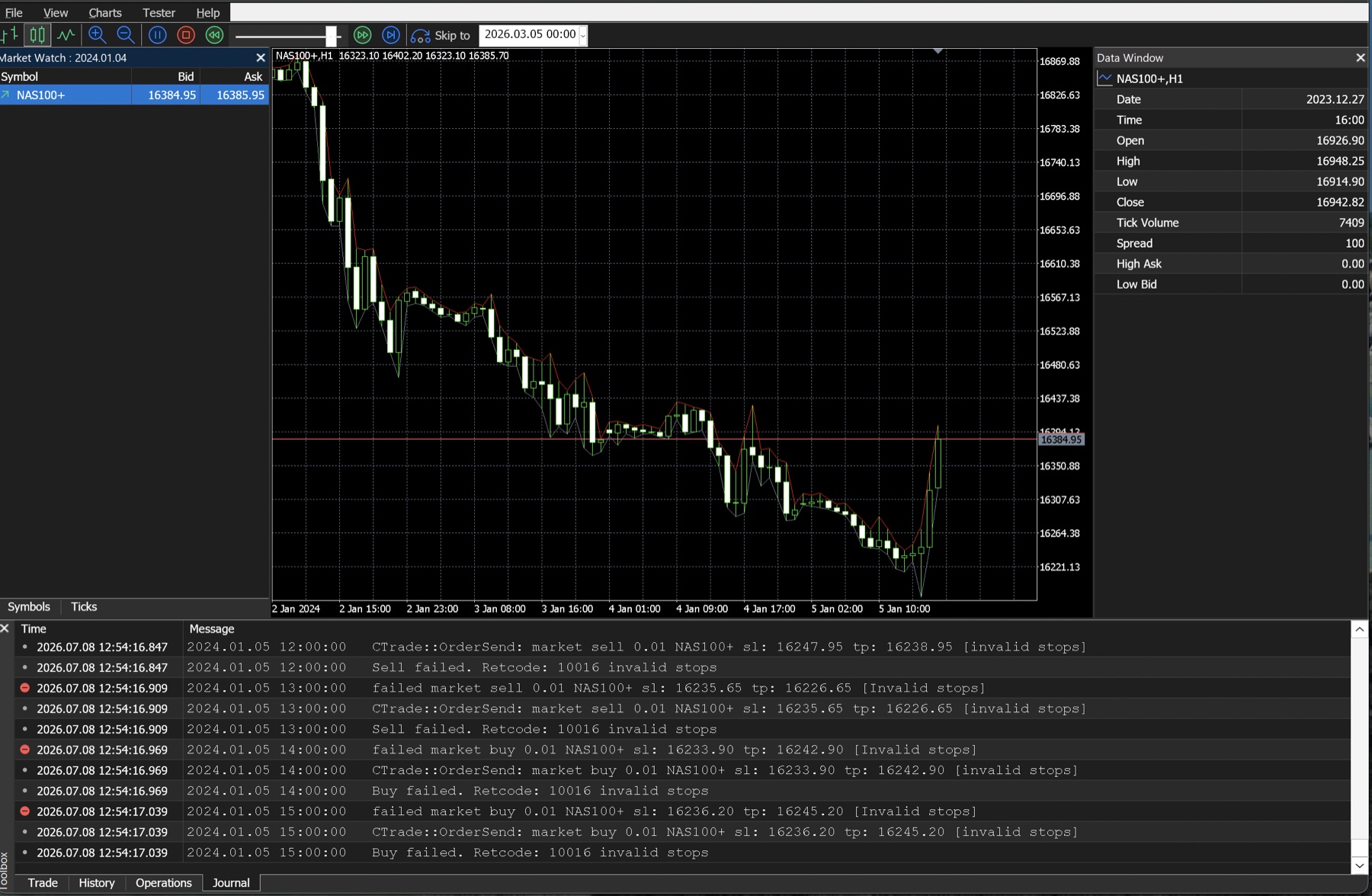
Use Strategy Tester to reproduce the failure
Strategy Tester is useful because you can replay the same EA and inputs over a short date window. Record:
| Test field | Why it matters |
|---|---|
| MT5 build and server | Symbol rules and tester behaviour can differ |
| Exact symbol | Suffixes and contract specifications matter |
| Modelling mode | Intrabar quotes can change stop timing |
| Date and event time | Lets you return to the same quote sequence |
Inputs .set file | Prevents silent parameter drift |
| Journal export | Preserves the request and server response |
Turn on visual mode only long enough to observe the failing order. Then rerun without visual mode if you need a longer confirmation. See the reproducible MT5 backtesting workflow for the complete test record.
Do not use a stopless order as the default workaround
A common workaround is to open a position with SL=0 and TP=0, then modify it afterward. This can leave the position unprotected if the terminal disconnects, the modification is rejected, or the market moves into a freeze zone.
Only use a post-fill modification flow when the execution environment explicitly requires it and the strategy has defined, tested handling for every failure path. At minimum, the EA must detect the missing protection, retry under bounded rules, and close or otherwise contain risk when protection cannot be established. “Send without stops and hope the next call works” is not a safe recovery design.
Common failed fixes
| Attempt | Why it is incomplete |
|---|---|
| Multiply every stop by ten | Hides the unit or direction bug and changes strategy risk |
Call only NormalizeDouble | Decimal precision does not guarantee tick-size alignment |
| Hard-code one broker's minimum | Symbol rules can differ by server, suffix, account, and time |
Use _Digits but ignore tick size | A quoted decimal can still be off the tradable grid |
| Check stops level only at startup | Current quotes and server conditions can change |
| Ignore the CTrade result code | The local method can complete while the server rejects the request |
| Reuse market-order logic for pending orders | Pending entry and stop-limit prices add constraints |
| Remove SL/TP permanently | Eliminates protection rather than correcting the request |
Final checklist
- Exact symbol specification is recorded.
- Current Bid and Ask are read from one
MqlTick. - SL and TP are on the correct side for Buy or Sell.
- Inputs are converted from their documented unit to price exactly once.
- Minimum distance uses
SYMBOL_TRADE_STOPS_LEVELplus a deliberate buffer. - Every submitted price is aligned to
SYMBOL_TRADE_TICK_SIZE. - Modification logic checks
SYMBOL_TRADE_FREEZE_LEVEL. - Pending orders have separate validation.
CTradeserver result code and description are logged.- The smallest failing tester case now passes without changing the signal rule.
- Position sizing is recalculated after any stop-distance change.
Frequently asked questions
Why do invalid stops occur when the stops level is zero?
Zero does not waive direction, tick-grid, pending-order, current-price, or server-side rules. Log the complete request and current symbol state instead of relying on that one property.
Are 100 points the same as 10 pips?
Not universally. Pip conventions are market-specific, while an MQL5 point comes from the symbol. Use SYMBOL_POINT, tick size, and the strategy's documented unit.
Why does a stop work in Strategy Tester but fail on demo?
The historical quote path, spread, execution timing, symbol configuration, and server conditions can differ. Compare logs from the same EA version and inputs; do not assume either environment proves live behaviour.
Should I include freeze level in the initial stop distance?
Freeze level primarily matters for operations near the market, especially modifications. Check stops level for initial placement and apply freeze-level rules to the modification path. A conservative buffer may be justified, but document it rather than silently merging unrelated rules.
Risk note
Correcting an invalid-stops error only makes a trade request technically acceptable. It does not make the strategy, stop distance, or position size prudent or profitable. Wider stops can increase loss per trade unless volume is recalculated, and leveraged trading can produce rapid, substantial losses.
This guide is educational and broker-neutral. It does not recommend an EA, instrument, parameter, or trade. Confirm current symbol-property definitions in the official MQL5 symbol constants reference opens in a new tab and validate behaviour on the actual target account environment.
Up next
Next, build an EA validation workflow from backtest to forward demo: freeze the code and inputs, define failure conditions before observation, monitor order-state recovery and protective stops, and document why a strategy should advance, pause, or be rejected.